
The refusal is information, not a dead end
Your editor refuses a file for one of three reasons: it cannot read the format at all, it reads a version of it badly, or it reads the container but not the codec inside. Each reason points to a different route. Opening the file somewhere else keeps everything in it, layers, vectors, tracks, but moves your work into a second tool. Converting it keeps your tool and changes the file, and what the conversion flattens or drops decides whether that trade was wise.
PSD and AI files: open first, convert on purpose
A PSD opened in a compatible editor keeps its layers editable; the same file converted to PNG is a picture of your design. The AI case is sharper still. Canva's AI converter, one of the pages we verified for this article, turns an Illustrator file into JPG, PNG, SVG on its Pro tier, PDF or PPTX: fine for handing off, wrong for continuing vector work, because the conversion is the moment the editability is spent. This blog's opener guides rank the programs that read PSD and AI files natively; use conversion when the destination is a person, not a project.
MKV: convert first, and lose almost nothing
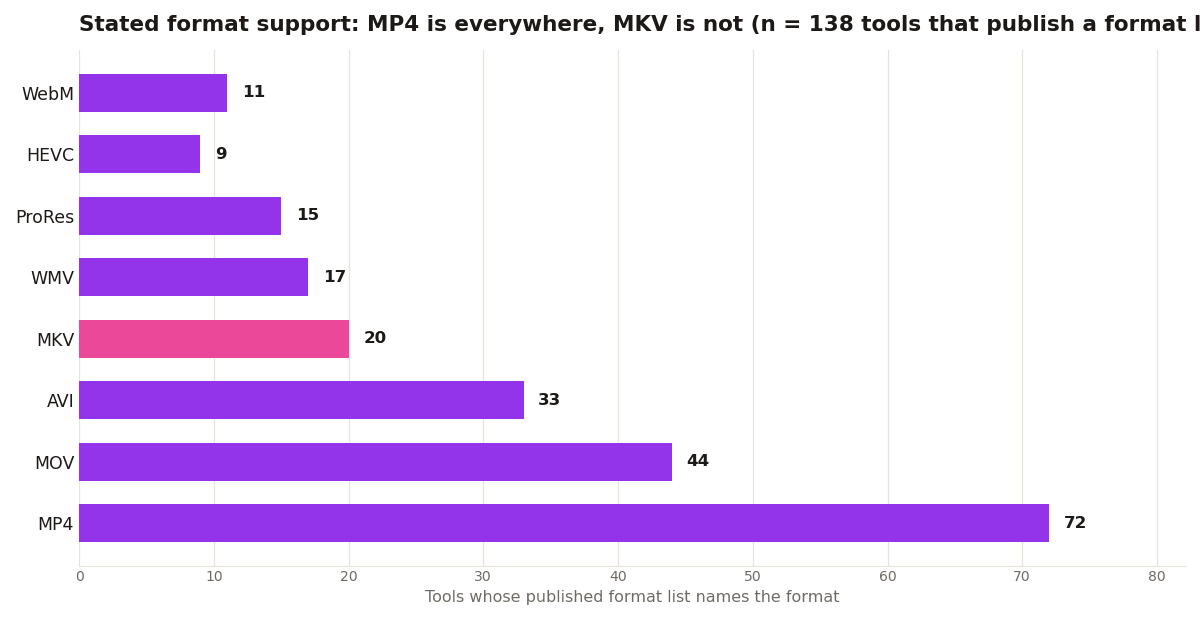
Video containers reverse the logic. An MKV that DaVinci Resolve or Premiere will not take converts to MP4 with the same streams inside in the common case, which is why this site carries both a converter comparison and an MKV support chart: the format is a wrapper, and rewrapping it is cheap. The exceptions are real, multiple audio tracks and subtitle tracks need checking after conversion, but the default route for video is convert, while the default route for design files is open.
The rule to keep
If the file's internal structure is the work, layers, vectors, timelines, open it in a tool that reads it. If the file is a delivery, a clip, a proof, a hand-off, convert it into whatever the receiver already reads. Most file misery comes from applying the delivery route to a work file.