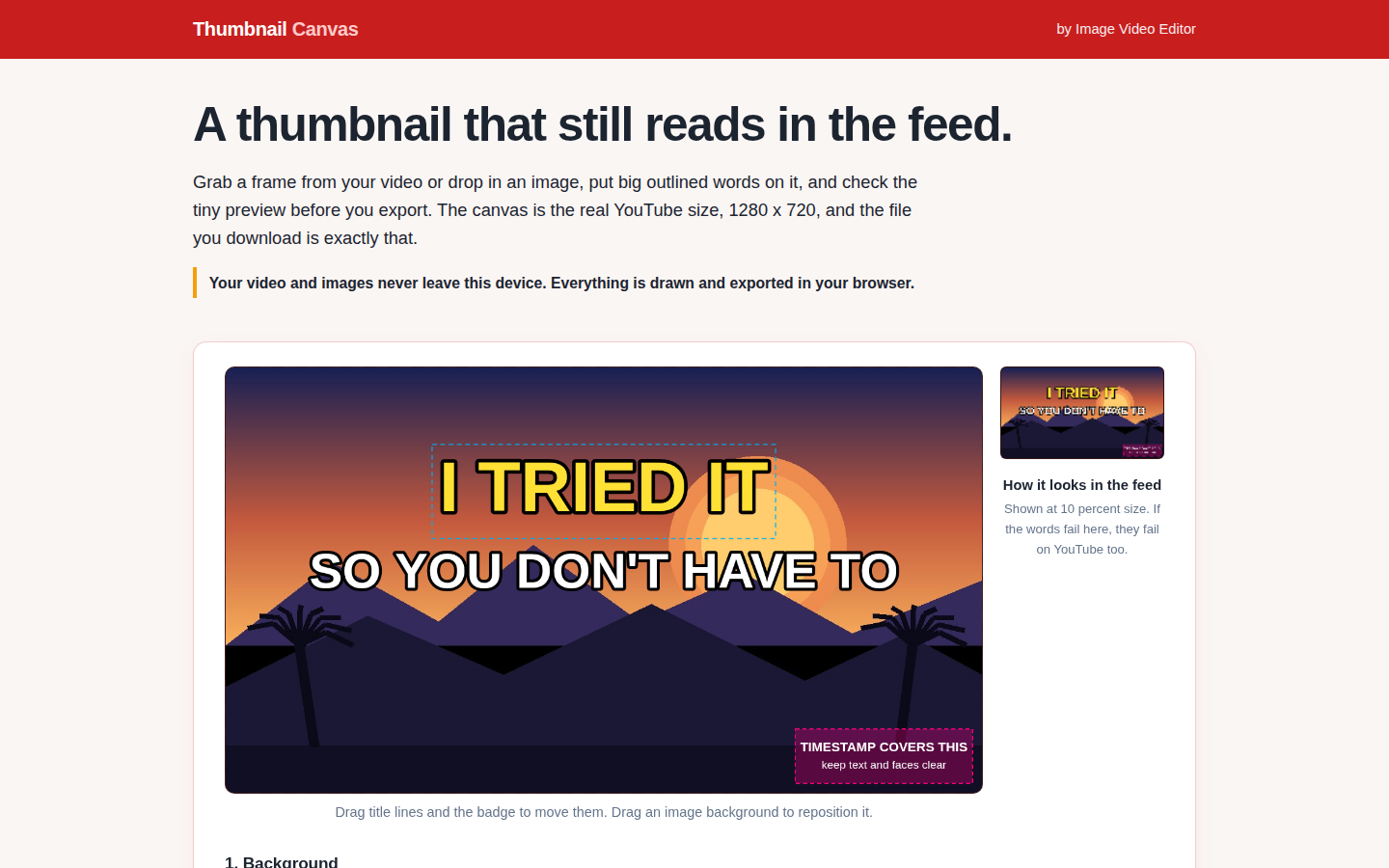
Most thumbnails fail at the size nobody designs for: the small rectangle in the feed. The free Thumbnail Canvas is built around that failure. Its canvas is the real YouTube thumbnail size, 1280 by 720, and next to the canvas sits a live preview of your thumbnail at 10 percent size, so you see the feed version while you still can fix it.
Start from a frame grabbed from your video, an image you drop in, a flat color, or the built-in demo scene. Add up to three title lines, set the size, font and outline, and drag everything into place. A subtle badge is optional. Editor guides, including a rule of thirds overlay and a warning patch over the bottom right corner where YouTube stamps the video duration, help you compose and are never burned into the export.
How a thumbnail comes together
- Set the background. Grab a video frame, drop an image, pick a color, or try the demo scene.
- Type your title lines. Few words, big type. Three lines fit; two usually reads better.
- Style and place them. Size slider, three fonts, outline width and color, shrink to fit, then drag lines and badge where you want them.
- Check the tiny preview. If the words fail at 10 percent, change them now.
- Export. A PNG or JPG at exactly 1280 by 720, the size you designed at.
Everything in the Thumbnail Canvas happens on your device: your video and images never leave it, and nothing is uploaded. Editing and previews are always free; two exports a day are free, and after that an email unlocks unlimited exports for the rest of the day.
Add text to a YouTube thumbnail online, free
The words are the part most makers rush, so the Canvas treats every line as its own object. You get up to three title lines, and each one is styled on its own: pick from three font stacks, set the size, choose a palette or custom color, switch bold on or off, add an outline with its own width and color, align left, center or right, and let shrink to fit pull an overlong line back inside the margins. Then drag the line where it belongs; nothing is locked to a template slot.
A workable order: write the shortest version of the title first, style the biggest line, then check it in the 10 percent preview before adding a second line. The companion post runs the full routine as six checks, including why the outline does more than any effect. And because the whole editor runs in your browser, redoing the text costs nothing: editing is free, and you only spend an export once the words read at feed size.
Exports come out as PNG or JPG at exactly 1280 by 720, and they carry no watermark. That is the plain fact behind the common search for a youtube thumbnail maker with no watermark: the file you download is the file you designed, unmarked. Two exports a day are free; after that, an email unlocks unlimited exports for the rest of the day. Open the Thumbnail Canvas and put the words on first this time.
Who it is for
Creators cutting long videos into clips who currently screenshot a frame and hope. It pairs with our Shorts clipping guide: the clip gets the click only if its packaging reads. Our roundup of thumbnail maker apps compares the alternatives. The companion post runs the quality bar: six checks to run at 10 percent size before you upload anything. And once the horizontal thumbnail is done, the Story Frame Maker on our sister site frames the vertical version.